Summary: email campaign management software centralises the creation, sending, segmentation, and analysis of your emails on a single platform. Choosing the right tool makes the difference between a growing list and one that deteriorates. This guide covers the essential criteria for making that decision wisely.
What is email campaign management software and what is it for?
Email campaign management software is a platform that allows you to plan, design, send, and measure emails to contact lists in a centralised and repeatable manner. It's not an email client like Outlook or Gmail, but a specific tool for marketing or transactional communications at scale. According to industry data collected by Litmus in their annual report, email remains the channel with the highest return on investment in digital marketing, with an average return of 36 euros for every euro spent on well-configured campaigns. This figure means that choosing the right software is no minor detail: it determines how many contacts will receive the message, with what level of personalisation, and what data you'll obtain to improve the next send.
The difference between a basic and a professional platform isn't just in the number of sends. It lies in whether you can segment your list before hitting send, whether emails land in the inbox or spam, and whether the subsequent report tells you anything useful.
Professional email campaign management software covers these three layers: preparation, delivery, and analysis.
That said, not all businesses need the same tool. An online store with 5,000 subscribers has different needs from a B2B company with long sales cycles and highly segmented lists.
Therefore, before choosing a platform, it's advisable to map out your actual use case: one-off mass mailings, automated flows, transactional emails, or a combination of all three?
Most current platforms offer a free trial or a limited entry-level plan. Taking advantage of this window to test the editor's usability, automation logic, and report readability is more useful than comparing feature tables on paper.

What functionalities are essential in email campaign management software in 2026?
In 2026, competitive email campaign management software must offer, at a minimum, a drag-and-drop visual editor, list management with tags or custom fields, subscriber behaviour-based automation, native A/B testing, and real-time reports with open, click, and unsubscribe data. Any platform that doesn't cover these five pillars presents significant limitations for a marketing team looking to scale without accumulating manual work.
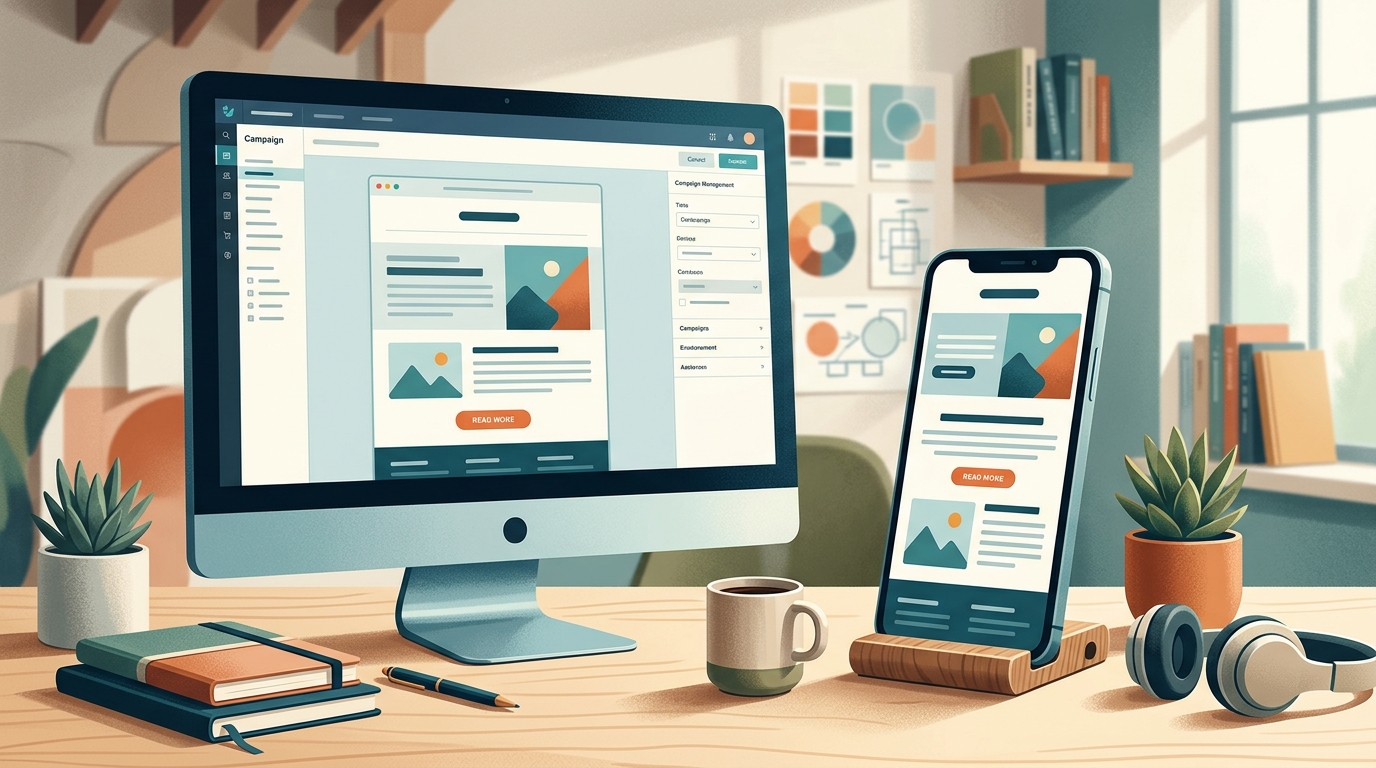
The visual editor is the most frequent point of contact with the tool. An editor that generates clean, responsive HTML without requiring the user to know how to code saves hours every week.
The problem with some legacy editors is that they produce heavy code, which significantly increases the chances of the email client displaying the email incorrectly, especially on mobile.
List management and custom fields
Contact list management is the core of any campaign. The most advanced platforms allow you to enrich each contact with custom fields (industry, job title, purchase history, last interaction date) and use them both for segmentation before sending and for personalising content within the email itself. This goes beyond inserting a name in the subject line: it allows you to display different content blocks based on the recipient's profile.
An underestimated aspect is the management of unsubscribes and bounces. The software must process unsubscribes automatically and immediately (a requirement of GDPR in Spain and Europe) and distinguish between soft and hard bounces to clean the list without manual intervention.
Clean lists improve the sender domain's reputation, which in turn enhances deliverability.
A/B testing and experimentation
A/B tests email marketing allow you to compare two versions of the same email (subject line, sender, content, send time) with a sample of the list before sending the winning version to the rest. This functionality, once exclusive to enterprise platforms, is now available in almost all paid plans. Using it systematically is what transforms intuition into data-driven decisions.
How to evaluate an email platform's deliverability?
Email campaign deliverability is a platform's ability to ensure that sent emails reach the recipient's inbox and not the spam folder, or get blocked before reaching the server. It's the most critical factor and the hardest to compare using feature tables. A platform with low deliverability might have the best editor on the market but prove completely useless if 30% of sends don't arrive. According to industry data published by Return Path (now Validity), the average deliverability rate for professional email marketing providers is around 83% globally, meaning almost one in five emails doesn't reach the recipient's inbox.
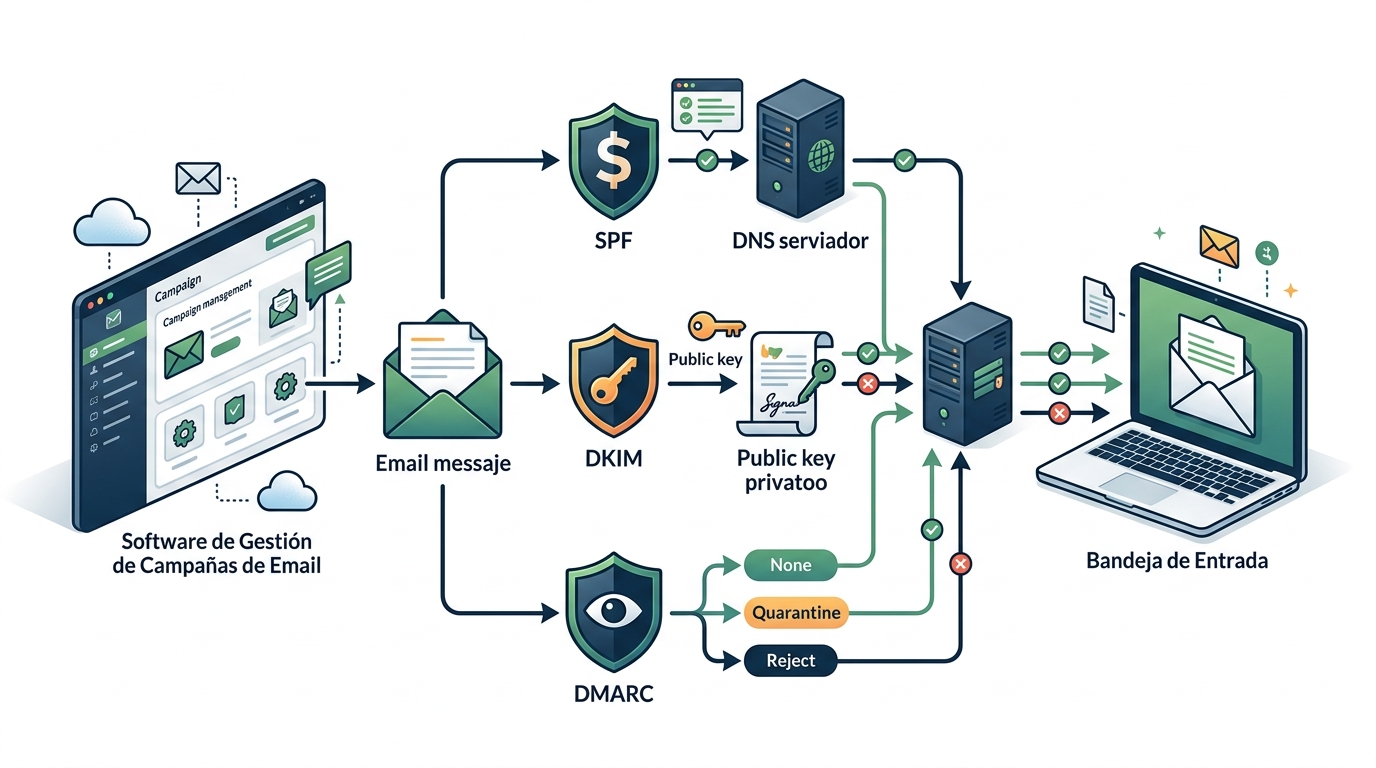
The factors determining deliverability are divided into two groups: those dependent on the platform (reputation of its shared IPs, sending infrastructure, support for SPF, DKIM, and DMARC authentication) and those dependent on the sender (list quality, spam complaint rate, sending frequency).
SPF, DKIM, and DMARC authentication
Any serious platform must allow you to configure SPF and DKIM records on the sender's domain. Since 2024, Google and Yahoo require bulk senders to have DMARC configured. A platform that doesn't guide the user through this process or doesn't support dedicated IP in advanced plans is a red flag.
Platform support for dedicated IPs (versus IPs shared with hundreds of other clients) is relevant when sending volumes exceed 50,000-100,000 emails per month. With shared IPs, the reputation of other senders affects yours.
Sender domain reputation
Domain reputation is the sender's responsibility, not the platform's.
Using the same domain as your corporate website for mass campaigns without prior warming up can damage the deliverability of your transactional emails (invoices, order confirmations).
Some companies use a specific subdomain for marketing (e.g., news.yourcompany.com) precisely to isolate that reputation.
How do advanced segmentation and personalisation work in email marketing?
Email marketing contact segmentation is the process of dividing your list into groups with common characteristics or behaviours to send them more relevant messages. Current platforms allow segmentation by demographic data, purchase behaviour, interaction with previous emails (opened, clicked, didn't open in X days), and external data integrated via API or CRM. Message relevance is the biggest factor influencing open rates and ensuring subscribers don't mark emails as spam.
Personalisation goes beyond just the name in the subject line. Advanced platforms allow for dynamic content blocks: the same email can display content A to segment 1 and content B to segment 2, without needing to create two separate campaigns.
This reduces team workload and maintains design consistency.
Behavioural Segmentation
Behavioural segmentation analyses how each contact has interacted with previous emails. Subscribers who opened the last three emails have a very different profile from those who haven't opened anything for six months.
Treating both groups the same degrades overall metrics and jeopardises sender reputation.
Inactive subscriber re-engagement campaigns are a classic use case for behavioural segmentation: the inactive segment is identified, a specific sequence is sent with an incentive or a direct message asking if they wish to continue receiving communications, and those who don't react are removed from the active list. This process, when well-executed, improves all channel metrics.
CRM and External Source Integration
The integration between email campaign management software and the company's CRM is the bridge that transforms customer data into relevant communications. If the CRM records that a customer purchased three months ago but hasn't returned, the email software can automatically trigger a win-back campaign. Without this integration, the marketing team operates with an outdated view of their contacts.
Integrations can be native (the platform offers an official connector with the CRM), via API, or through intermediate automation tools like Zapier or Make. Native integrations are usually more stable and require less technical maintenance.
How does email campaign automation work?
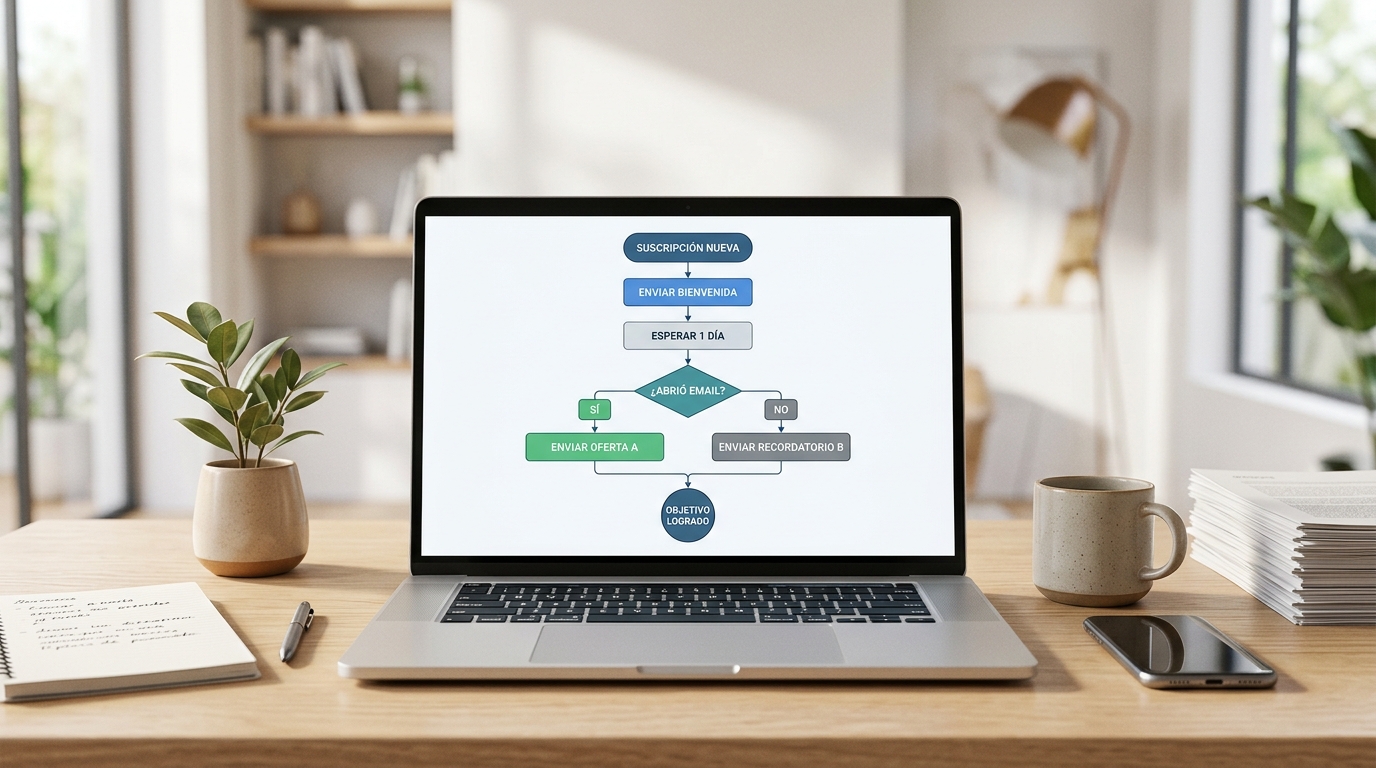
Email campaign automation allows for automatic email sending in response to actions or events: a subscription new subscription, a purchase, cart abandonment, the subscriber's birthday, or inactivity for a specific period. By 2026, automation is no longer a differentiating feature but a baseline expectation for any professional platform. What truly sets platforms apart is the sophistication of their rule engine and the ease of use of their workflow editor.
Automation flows (also called workflows or journeys depending on the platform) are built like a map of conditions and actions: if the subscriber does X, wait Y days, then send email Z; if they didn't open, send a variant; if they clicked on product link A, add the corresponding tag.
Complexity can scale as much as the strategy requires.
Welcome and onboarding flows.
The welcome flow is the first automated contact after subscription. It's when the new subscriber's attention is highest and the most profitable time to set expectations and present the brand's value.
A sequence of 3-5 emails in the first 7-14 days after subscription has significantly higher open rates than typical mass mailings.
The software should allow these flows to be configured without technical intervention and offer the option to exit the flow if the subscriber performs the target action before the sequence ends (e.g., if they purchase before the last email in the series).
Purchase Behaviour-Based Automation
For businesses with an online store, post-purchase automation covers order confirmations, shipping tracking emails, review requests, and upsell or cross-sell campaigns X days after purchase. For this automation to work, the software must integrate with the e-commerce platform and receive purchase events in real-time.
Analytics and reports: metrics that matter
Reports from an email campaign management platform should go beyond showing how many emails were sent. Essential metrics include: delivery rate (emails that reached the recipient's server), open rate (opened emails out of delivered), click-through rate (CTR on delivered emails), click-to-open rate (CTOR, clicks out of opened), unsubscribe rate, spam complaint rate, and bounce rate (distinguishing between hard and soft bounces). Each metric tells a different part of the sending story, and none should be read in isolation. The most comprehensive platforms allow these metrics to be viewed by segment, device, and email client, making it easier to optimise design and content specifically.
Since Apple introduced Mail Privacy Protection in iOS 15, open rates have lost accuracy as a primary indicator: many recorded opens are false positives generated by Apple's image preloading.
That's why CTOR (clicks to open rate) and the click-through rate on delivered emails have become the most reliable indicators of real engagement.
Revenue Attribution
Advanced platforms allow email clicks to be connected to sales generated in the store, attributing revenue to each campaign. This transforms email reports into business reports, not just communication reports.
For this attribution to work, it's necessary to integrate the platform with the e-commerce system and correctly configure UTM tracking on email links.
Comparative Reports and Industry Benchmarks
Some platforms offer industry benchmarks within their own reports: they compare account metrics with averages from other users in the same sector. This data contextualises whether an open rate of 22% is good or could be improved in the company's specific niche.
What criteria should you review before subscribing to email campaign management software?
Before subscribing to email campaign management software, there are five criteria that need to be reviewed in detail: the pricing model (per contact, per send, or both), the entry-level plan limits, the quality of support (if it includes Spanish support and through which channels), the native integrations available with your current tech stack, and the contract terms regarding data portability upon cancellation. Software that doesn't allow you to export all your contacts and their historical data in a standard format when cancelling your account is a dependency worth avoiding.
The pricing model deserves special attention because it can be misleading. Some platforms charge for stored contacts (including inactive and unsubscribed ones), which inflates the real cost if the list grows even if sends don't increase.
Others charge by send volume, which favours businesses that send little to many contacts. Comparing the projected 12-month cost with your actual contact base data is more informative than just looking at the basic plan price.
Spanish Support and Documentation
For teams working in Spanish, the quality of documentation and support in Castilian Spanish is a practical criterion. Anglo-Saxon platforms often have excellent documentation in English and limited resources in Spanish.
If the team doesn't have technical profiles with a high level of English, this creates real friction in adoption and problem-solving.
GDPR Compliance
GDPR and email marketing are inseparable for any business operating in Spain or the European Union. The platform must facilitate consent management, recording the source of each subscriber, managing access and deletion rights, and signing a Data Processing Agreement (DPA) with the provider. If the platform stores data on servers outside the EU, it's necessary to verify that adequate safeguards are in place (standard contractual clauses, adequacy decision, etc.).

What are the most common mistakes when managing email campaigns?
Managing email campaigns without a clear strategy produces predictable results: lists that deteriorate, metrics that worsen over time, and subscribers who get fed up. The most common mistakes observed in teams starting to use email marketing software professionally are: always sending to the entire list without segmenting, not regularly cleaning inactive contacts, using the same subject line for all segments, not checking mobile design before sending, and not conducting systematic A/B tests.
The mistake of sending to the entire list without segmenting is the most widespread and costly. When someone receives an email that isn't relevant to them, the likelihood of them ignoring it or marking it as spam increases.
Over time, sender reputation deteriorates, and emails stop reaching the inbox even for active subscribers.
Neglecting List Hygiene
Email marketing list hygiene involves regularly removing or suppressing contacts who don't interact, accumulated hard bounces, and erroneous addresses. A list without hygiene grows in number but loses effectiveness. Professional platforms automate part of this process (immediately processing hard bounces), but managing inactive contacts requires an active team decision.
A practical rule used by many email marketing teams is to review contacts who haven't opened any emails for more than six months, run a re-engagement campaign, and if they don't react, suppress them from regular mailings.
This isn't losing subscribers: it's maintaining a list that works.
Ignoring Mobile Optimisation
According to email client usage data published by platforms like Litmus, over 50% of emails are opened on mobile devices.
A design that isn't responsive or has buttons too small for a touchscreen loses half its potential before the subscriber even reads the first line.
The software's editor should natively generate responsive code and allow design preview on different screen sizes before sending.
Frequently Asked Questions
What's the difference between an ESP and email campaign management software?
An ESP (Email Service Provider) is the infrastructure provider that delivers emails. Email campaign management software includes the ESP plus segmentation, automation, design, and reporting tools. In practice, many platforms integrate both layers.
How many emails can I send per month with a standard platform?
It depends on the plan you've subscribed to. Entry-level plans usually include between 5,000 and 20,000 monthly sends. Professional plans range from 50,000 to unlimited sends with variable costs based on volume.
Does email marketing software also manage transactional emails?
Some platforms manage both types (marketing and transactional campaigns like order confirmations or password recovery), but many businesses use separate tools for each.
Transactional emails require high delivery speed and often have different technical requirements.
What happens to my data if I cancel my platform subscription?
This varies by provider. It's essential to review the contract terms before subscribing: some offer an export period after cancellation, others delete data immediately. Exporting your list as a CSV before cancelling is always the first step.
How long does it take to set up an email marketing platform?
A basic setup (account, authenticated domain, imported list, and first template) can be done in a day if the data is ready. Complex automation flows and CRM integrations can take between one and four weeks, depending on complexity.
Is a paid plan necessary for professional email marketing?
Free plans are useful for getting started and testing the platform, but they have significant limitations: contact numbers, send volume, no removal of provider branding, and limited support.
For continuous professional use, a paid plan is necessary once your list exceeds 500-1,000 active contacts.
