Summary: A CRM software with marketing automation for small business email marketing centralises customer data and triggers campaigns at the exact moment, without manual intervention. For a small business, this means reducing sales follow-up time, improving lead conversion rates, and maintaining active communication with the customer base without needing a dedicated marketing team.
What is a CRM with email marketing automation and why it matters to small businesses
A CRM software with email marketing automation for small businesses is a platform that combines customer relationship management (contact history, status of the sales funnel, interaction log) with the ability to send automated emails based on the contact's behaviour or position in that funnel. According to data published by Statista in 2024, email remains the marketing channel with the highest return per euro invested in Europe, surpassing paid social media ads. For a small business with limited resources, combining both capabilities in a single system eliminates duplicate work: there's no need to export lists from the CRM, import them into an email tool, and manually synchronise results. Everything happens in the same environment, which reduces the margin for error and shortens the sales cycle.
The central concept is that of automated nurturing sequences: when a lead enters the CRM (because they filled out a form, a salesperson added them after a call, or they made a first purchase), the system evaluates their tag, score, or status in the workflow and triggers the corresponding email without anyone needing to remember. This is especially valuable for small businesses where a single person manages sales, support platform and part of the operation. The CRM acts as a second employee who never forgets to follow up.
The difference compared to a basic CRM without an email layer is considerable. A CRM without automation tells you who the contact is and when the last interaction occurred, but the action of writing the email remains manual. When the portfolio exceeds 200 or 300 active contacts, this manual task becomes a bottleneck that slows down the sales cycle. Automated email marketing integrated into the CRM breaks this bottleneck because the logic of when and what to send is encoded in workflows that execute autonomously.
In the context of 2026, the maturity of these tools has lowered the price and technical complexity threshold to the point where a five-person small business can implement a functional system in less than two weeks, without the need for an in-house technical team.
This wasn't the case four years ago, when most platforms with real automation were geared towards medium and large enterprises.
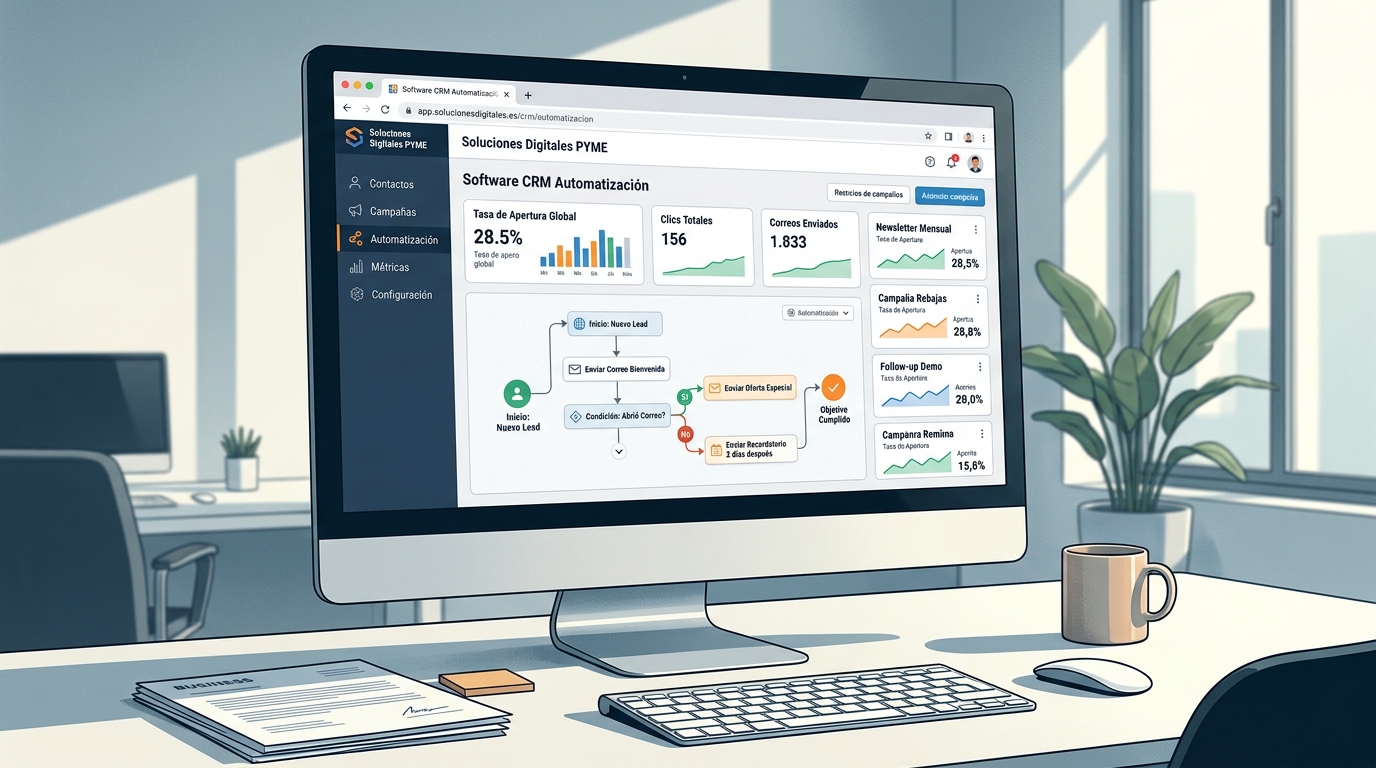
What features should a CRM with email marketing for small businesses have?
A CRM with email marketing automation aimed at small businesses must address five specific needs to justify its cost: centralised contact management, visual creation of automation workflows, lead segmentation by behaviour or stage, in-CRM campaign analytics, and General Data Protection Regulation (GDPR) compliance. Without these five pillars, the software ends up becoming a partial tool that requires supplementation with other services, bringing back the fragmentation problem it aimed to avoid. Segmentation, in particular, is the element that most differentiates a generic campaign from one that converts: sending the same email to all contacts in a database is less effective than sending different messages to groups with different behaviours and interests.
Contact management and sales workflow
The CRM's core must allow for recording not only the name and email address, but also the complete interaction history: emails sent and opened, calls logged, purchases made, pages visited if there's web integration, and sales team notes.
A visual sales workflow, with columns that represent the stages of the process (prospect, first contact, proposal sent, negotiation, client), allows you to see at a glance where each opportunity stands.
For a small business, the simplicity of the workflow is as important as its features. A system with too many stages or mandatory fields leads to abandonment by the sales team, who then revert to managing things in spreadsheets.
The best platforms for small businesses allow workflow customisation with just a few clicks and don't impose rigid structures.
The integration between the workflow and email flows is the differentiating element. When a contact moves from "proposal sent" to "negotiation", the system can automatically trigger a follow-up email with support information or an invitation to a closing call. This conditional trigger, based on movement within the workflow, is the sales automation that has the most impact on a small business's commercial results.
Automation workflow builder
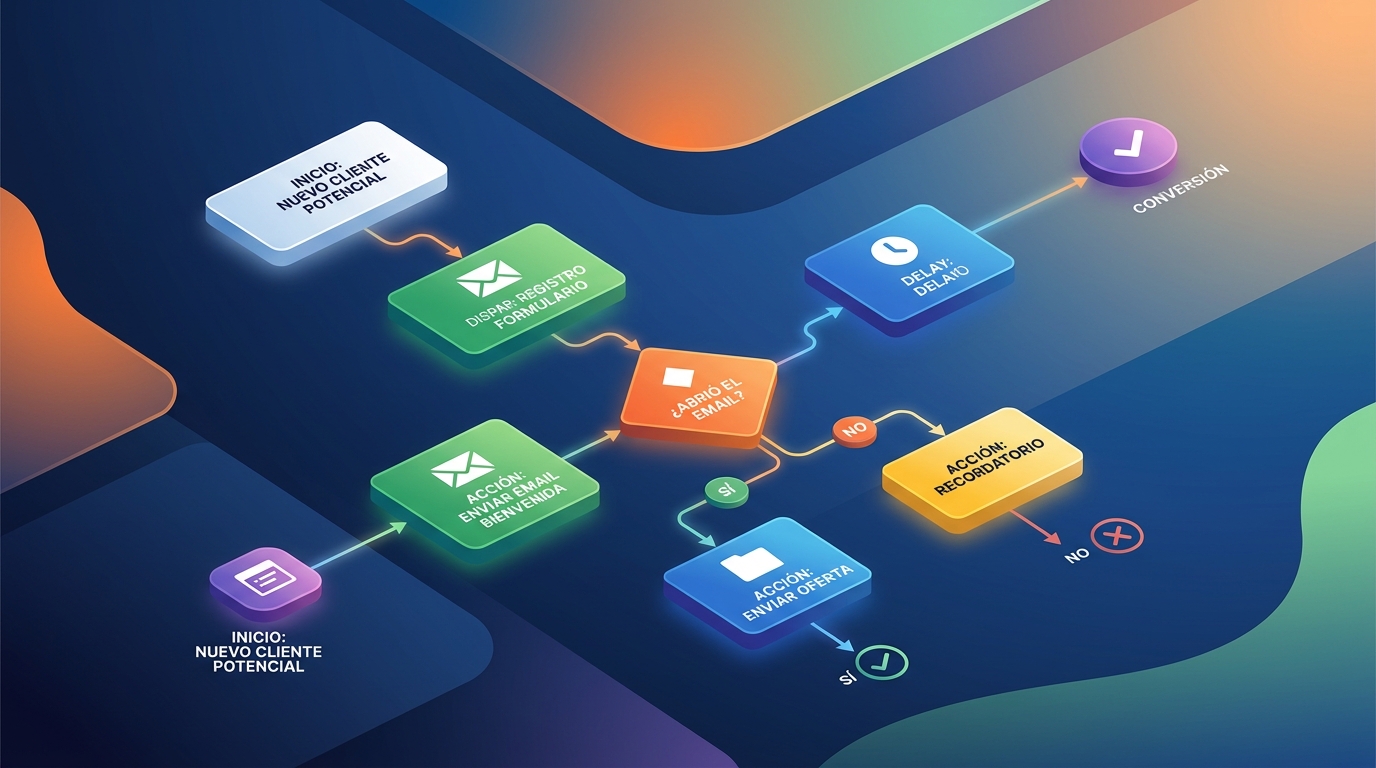
The visual workflow builder (commonly called a "workflow builder") is the interface where automation rules are defined: if X happens, wait Y days, then send email Z; if the contact opens the email, move to the next stage; if they don't open it within 72 hours, send a reminder.
This conditional logic is what distinguishes true automation from simple scheduled sending.
For a small business without programmers, the builder must be visual and based on drag-and-drop blocks.
The best builders on the market in 2026 incorporate pre-designed workflow templates for common use cases: new subscriber welcome, post-purchase follow-up, abandoned cart recovery (for ecommerce), or cold lead nurturing.
These templates reduce setup time to hours, not weeks.
The quality of the workflow builder also determines the extent of campaign personalisation: inserting the contact's name is the most basic level; more advanced systems allow for customising the entire email content based on the contact's attributes (sector, company size, product of interest), which significantly increases perceived relevance and, with it, open and click-through rates.
Dynamic segmentation
Contact segmentation into dynamic lists or groups allows the system to automatically update which contacts belong to each segment as their behaviour or data changes. A dynamic segment of "customers who purchased more than six months ago and haven't interacted since" updates itself daily without manual management.
This capability transforms the database into a living asset that responds to commercial reality in real-time.
Small businesses that work with static lists (exported at a specific moment) send messages to contacts who are no longer relevant or stop sending to contacts who are, which degrades both the recipient's experience and the sending domain's reputation.
Integrated analytics and deliverability
Email metrics should be viewable within the same CRM, without needing to access a separate platform. Open rate, click-through rate, bounces, unsubscribes, and conversions attributed to each email are the minimum indicators. More comprehensive systems automatically add the return on investment per campaign if the CRM has access to sales data.
Deliverability (ensuring the email reaches the inbox and not spam) depends on the platform's technical infrastructure and the sender's domain reputation.
Good CRM software with integrated email provides configuration guides for SPF, DKIM, and DMARC records, which are the authentication protocols that email providers like Google and Microsoft require to establish good domain reputation.
How email automation works within the CRM
Email automation within a CRM operates through triggers, conditions, and actions. A trigger is the event that initiates the sequence: the creation of a new contact, the opening of a previous email, a stage change in the workflow, a specific date (like the anniversary of the first purchase), or a visit to a specific website page if web tracking is active. The condition evaluates whether the contact meets certain criteria before executing the action. The action is what the system does: send an email, assign a task to the salesperson, move the contact to another segment, or update a field in the contact's profile. This chaining of triggers, conditions, and actions is what turns a CRM with email into a follow-up machine that operates 24 hours a day, including holidays and weekends, with no additional hourly cost.
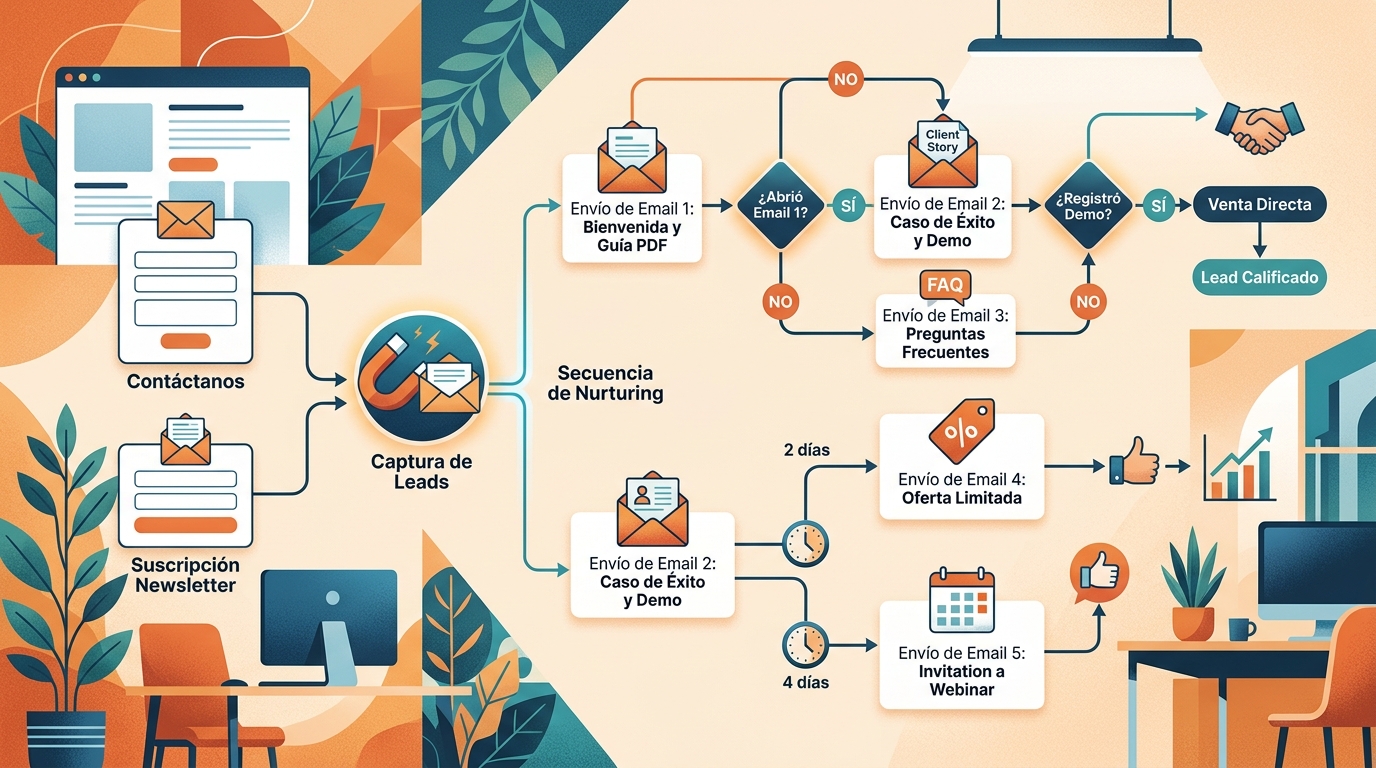
A typical nurturing sequence for a B2B small business might have this structure: the lead downloads a resource from the website (trigger), the system waits one hour and sends a welcome email with the attached resource and a brief company context (action 1), waits two days (time condition), checks if the email was opened (behavioural condition), if it was, it sends a second email with a relevant use case and a link to schedule a call (action 2), if it wasn't, it sends an alternative subject line variant (alternative action).
This type of logic, which would require constant reminders and manual work from a human team, is managed autonomously by the CRM.
Most useful automation types for small businesses
Several types of workflows generate the greatest impact for small businesses with limited resources. The first is the welcome sequence: the first emails a new contact receives largely determine their perception of the company and their likelihood of converting. The second is post-meeting or post-proposal follow-up, which automates the sending of supplementary information and response reminders without the salesperson having to manually schedule each one. The third is cold lead reactivation: contacts who have been inactive for weeks receive a specific sequence designed to rekindle interest before being marked as lost.
The fourth type, especially relevant for small businesses with an existing customer base, is the loyalty sequence: periodic emails with valuable content, service updates, or event invitations that maintain an active relationship between purchases. This type of automation transforms the CRM into a customer retention tool in addition to acquisition, which has a direct impact on customer lifetime value (LTV).
Integration with the website and other channels
Most CRM platforms with email offer a JavaScript snippet that, when installed on the website, records which pages each known contact visits and can use those visits as triggers.
If a contact visits the pricing page three times in a week, the CRM can automatically notify the assigned salesperson or trigger a specific email with hiring information.
In addition to the website, integration with lead capture forms (both native to the platform and from external tools like Typeform or Google Forms), e-commerce platforms, and video call tools completes the data ecosystem that feeds automation. The more touchpoints the CRM records, the more precise the behaviour-based segmentation and the more relevant the automated emails become.
What are the differences between an integrated email CRM and separate tools?
Managing CRM and email marketing with separate tools (for example, a basic CRM plus an independent email marketing platform) is a common practice in small businesses that have incrementally added tools.
The result is often a situation of duplicated data, broken synchronisations, partial customer visibility, and high administration time.
A 2023 Gartner study on data management in European companies noted that sales teams in small businesses spend between 20 and 30 percent of their time on data administration tasks that do not generate direct value, largely due to tool fragmentation.
The integrated email marketing CRM eliminates this fragmentation. The contact profile shows sales history, salesperson conversations, and marketing emails received and opened all on a single screen. A salesperson calling a prospect can see that the prospect opened the last nurturing sequence email two days ago and clicked on the pricing page link, which gives them enough context to tailor the conversation. With separate tools, that level of context requires opening two or three different tabs and manually cross-referencing data.
Total cost and operational simplification
From a cost perspective, the integrated solution isn't always more expensive.
Many small businesses find that the sum of subscriptions to a basic CRM plus an email platform plus an automation tool exceeds the price of an integrated platform that covers all three functions.
Furthermore, the time cost of synchronising and maintaining integrations (which often break with API updates) is a hidden cost rarely accounted for when making comparisons.
Operational simplification also impacts internal adoption. A small team working with a single tool adopts it more easily and uses it more consistently than a team that needs to switch between three different interfaces. Consistency in use is what ensures CRM data is reliable, and reliable data is the foundation of any successful automated email marketing strategy.
What criteria should you evaluate to choose the right software for your small business?
Choosing the right CRM software with email marketing automation for a small business requires evaluating at least six specific criteria before committing to a subscription. The first is the limit on contacts and emails included in each plan: many platforms apply tiered pricing that increases sharply when certain thresholds are exceeded, which can turn an apparently economical solution into an expensive one as the database grows. The second is the ease of migration from your current tool: importing contacts with full history is more complex than just importing emails, and a poorly managed migration process can lead to the loss of historical data relevant to the sales team.
Ease of use and learning curve
The learning curve is an underestimated criterion. A platform with many features but a complex interface can take months for a small team to adopt fluently, which delays the return on investment.
Free trials (most reputable platforms offer between 14 and 30 days) should be used by the people who will use the system daily (not just decision-makers) to evaluate real usability.
The availability of Spanish support is another important practical factor for Spanish small businesses. Platforms with English-only support add friction in resolving technical problems and during initial setup, which are the times when help is most needed.
GDPR compliance and data hosting
The General Data Protection Regulation (GDPR) is mandatory for any company processing data of European residents. When evaluating CRM software with email, it's essential to verify that the platform allows for managing contact consent (when they gave consent and for what purpose), that it offers the ability to export and delete a contact's data upon request (right to erasure and data portability) and that the servers where data is hosted are located in the European Union or under international data transfer agreements compliant with GDPR.
Some platforms hosted exclusively in the United States have faced compliance difficulties following successive rulings by the Court of Justice of the European Union on transatlantic data transfers.
For a Spanish small business, working with a platform that hosts data on EU servers simplifies regulatory compliance management and reduces the risk of penalties from the Spanish Data Protection Agency (AEPD).
Integrations with the tools you already use
No platform operates in a vacuum.
The CRM with email must connect with the tools the small business already uses: the invoicing system, the online store if applicable, the website form, the calendar for scheduling meetings, and, if the team uses internal communication, with project management tools.
Most modern platforms offer native integrations with the most popular services and connectors via integration platforms like Zapier or Make for the rest.

Plan scalability
A small business grows, and the software must grow with it. Evaluating what happens when the database doubles (in price and available features) avoids surprises after twelve or eighteen months of use.
Platforms with transparent, gradually tiered pricing are preferable to those with abrupt price jumps between plans.
It's also worth evaluating whether the entry-level plan limits key automation features.
Some platforms reserve advanced automation workflows for more expensive plans, meaning the small business starts with a limited version that doesn't reflect the system's true capabilities.
Requesting access to automation features during the trial period and evaluating the plan that will actually be used (not just the basic one) is the way to make a real comparison.
What are the most common mistakes when implementing a CRM with automation in a small business?
The most common mistake when implementing a CRM with email automation in a small business is importing the entire existing database without first cleaning it. A database with duplicate contacts, obsolete emails, or people who never gave consent to receive commercial communications degrades the sending domain's reputation from day one, causing emails to fall into spam even for valid contacts. Before setting up the first automation workflow, it's essential to clean and validate the database.
The second common mistake is designing overly long and complex automation workflows from the outset.
A sequence of twenty emails over three months might seem like a robust system, but if the emails aren't well-written or the conditional logic doesn't reflect the contacts' real behaviour, the result is a sequence that generates unsubscribes and spam reports instead of conversions.
It's advisable to start with short workflows of three or four emails, measure the results, and optimise before adding complexity.
The third mistake is not assigning a clear internal owner for the CRM. Without an owner who regularly reviews active workflows, updates email templates, and cleans data, the system quickly degrades.
In a small business, this doesn't require a full-time person: two or three hours a week for review and maintenance is enough to keep the system running effectively.
The importance of email content quality
Automation manages the when and the to whom, but not the what.
A poorly written automated email, with a generic subject line or lacking clear value for the recipient, will have a low open rate and a high unsubscribe rate, regardless of how sophisticated the automation workflow is.
Email content should answer a specific question from the recipient at the moment they receive it, offer something of value (useful information, a relevant offer, an invitation to a conversation) and have a clear, single call to action.
Content personalisation beyond just the name also makes a noticeable difference. Mentioning the contact's sector, the product they showed interest in, or the specific action they took (visited a pricing page, opened a previous email) makes the email seem written specifically for that person, which considerably raises the perceived relevance and likelihood of a response.
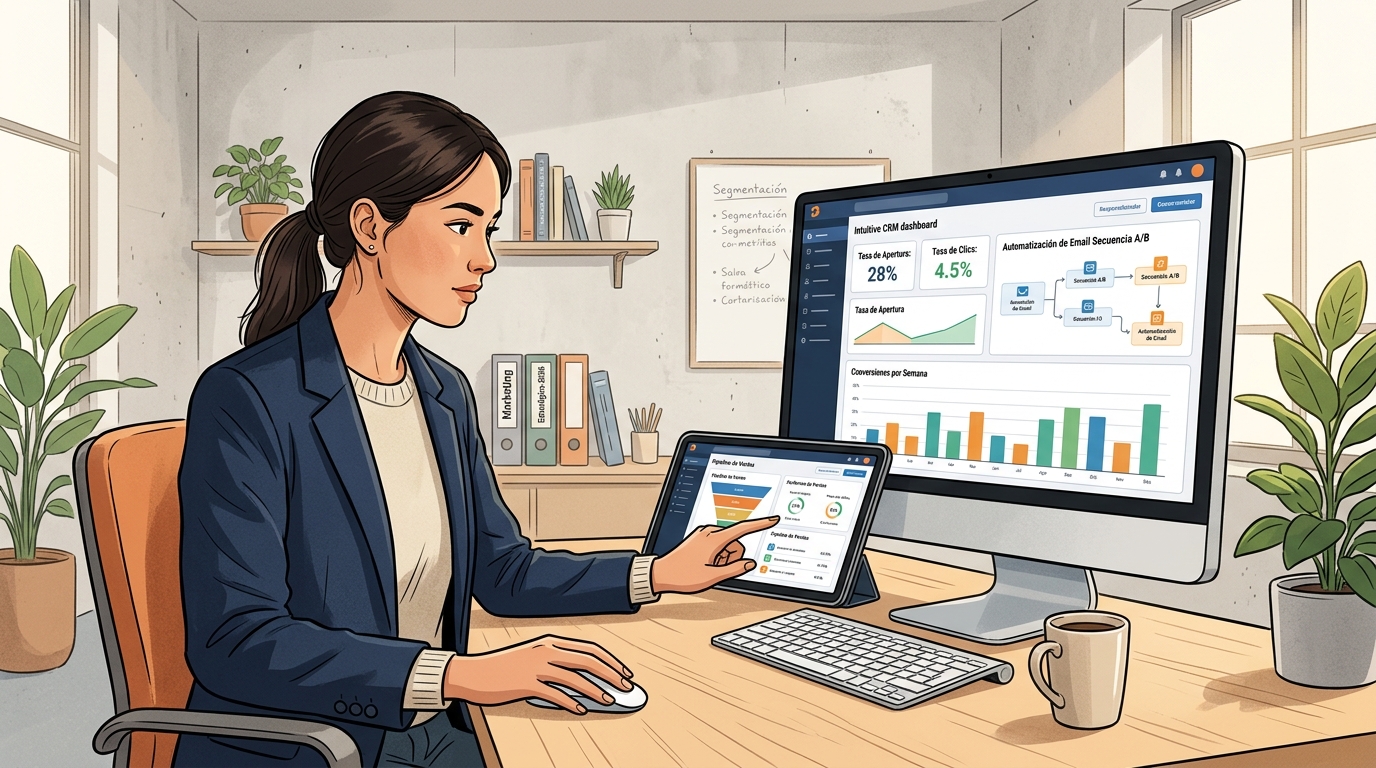
What is a CRM with email automation and what is it for in a small business?
A CRM is a program that centralises all customer and contact information in one place. When it includes email automation, it allows personalised messages to be sent automatically based on each contact's behaviour or situation, without anyone having to do it manually. For a small business, this means saving time on repetitive tasks, maintaining constant communication with potential and existing customers, and reducing the risk of a contact going unanswered due to lack of human resources. It's especially useful for companies with small teams that need to work in an organised and efficient manner.
Approximately how much does a CRM with email automation cost for a small business?
Prices vary widely depending on the provider and included features. There are free options with limited capabilities, suitable for businesses just starting out. Paid plans for small businesses typically range from 15 to 80 euros per month per user, depending on the number of contacts, allowed email volume, and available integrations. Some providers charge by the number of contacts instead of per user, which can be more economical if the team is large but the database is small. Before subscribing, it's advisable to calculate the total annual cost and include potential setup or initial training costs.
Is it complicated to set up a CRM with automated email sending if I don't have technical knowledge?
Most current software is designed so that anyone can configure it without needing to know how to code. They feature step-by-step wizards, ready-to-use email templates, and visual editors that allow you to create automated sending workflows by dragging and dropping elements. Even so, there is a learning curve, and it can take a few weeks to master all the features. Many providers offer video tutorials, Spanish documentation, and chat or phone support. If the small business doesn't have time for the initial setup, there are specialised professionals who can carry out the implementation for a fixed cost.
What's the difference between a CRM with email automation and a mass newsletter sending tool?
A mass newsletter sending tool is primarily designed to send the same message to a large list of recipients, with little personalisation and without recording each contact's history beyond general open or click statistics. A CRM with email automation goes further: it stores the complete history of each customer, allows for detailed segmentation, sends different messages depending on the stage each person is in, and connects emails with the rest of the commercial activity, such as quotes, calls, or meetings. For a small business that wants to manage lasting relationships with its customers, the CRM offers a much more comprehensive and useful view.
Frequently Asked Questions
Does a small business with fewer than ten people need a CRM with email automation?
Yes. Precisely because the team is small, automation has a greater impact: every follow-up email the system sends autonomously is time the team can dedicate to higher-value tasks.
The profitability threshold for these tools is low when the database exceeds one hundred active contacts.
How much does CRM software with email marketing automation for small businesses cost?
The range in 2026 goes from free entry-level plans with limited features to paid plans ranging from 20 to 150 euros per month for databases with fewer than 5,000 contacts, depending on the automation features included.
Plans with real automation and dynamic segmentation usually start from 40-50 euros per month.
Is it legal in Spain to send automated marketing emails?
Yes, provided the contact has given their express and specific consent to receive commercial communications, in accordance with GDPR and the Information Society Services Law (LSSI).
The most solid legal basis is unequivocal consent documented in the CRM, with the date and origin of consent recorded.
How long does it take to set up the first automation workflows?
With a modern platform and pre-designed templates, a small business can have its first three operational workflows (welcome, proposal follow-up, and lead reactivation) running within a week of part-time work, assuming the database is already clean and imported.
Can CRM with email marketing replace a salesperson?
No. CRM with automation manages systematic follow-up and nurturing communication, but closing conversations, negotiation, and building complex relationships still require human intervention.
The system frees up the sales rep's time to focus on those high-value tasks.
What metrics should I monitor in automated campaigns?
Essential metrics include: open rate (B2B industry benchmark in Europe is around 22-28 per cent according to Mailchimp Benchmarks 2024), click-through-open rate (CTOR), unsubscribe rate, hard bounce rate, and, if your CRM allows, conversions attributed to each email or sequence.
Reviewing these metrics monthly helps identify which flows need adjustments.
