Summary: Marketing automation without an agency involves setting up and managing automated lead generation, nurturing, and conversion workflows directly from your in-house team, without outsourcing to any third party. With current tools, a medium-sized business can operate complete campaigns without paying management fees to an agency.
Why more and more businesses are ditching agencies
Marketing automation without an agency is no longer an option reserved for large corporations with their own technical departments. By 2026, automation platforms have reduced their learning curve to the point where a team of two or three people can configure, launch, and optimise complete workflows without needing any intermediary. According to HubSpot data published in 2025, 67% of B2B companies with 10 to 200 employees manage at least part of their automated marketing internally. The main reason isn't just cost savings, but control: when a third party configures the workflow, the company loses visibility over the segmentation logic, lead scoring criteria, and trigger rules for each campaign.
This shift in model has three main drivers. Firstly, the democratisation of tools: platforms like ActiveCampaign, Brevo, or HubSpot Starter offer visual drag-and-drop interfaces that require no programming.
Secondly, the proliferation of accessible training: tutorials, free certifications, and active communities have reduced learning time to weeks, not months.
Thirdly, the opportunity cost of dependency: when an agency manages platform access, any urgent change — a flash promotion, a segmentation correction — requires an approval cycle that can take days.
That doesn't mean agencies have no value. They do, but in specific areas: brand strategy, large-scale creative production, or complex technical implementations.
However, the day-to-day operational management of automated workflows is something an in-house team can and should take on if they want to maintain competitive agility.

The real question isn't whether to outsource or not, but where to draw the line. And to answer that, you first need to understand which processes can be automated without advanced technical knowledge.
What processes you can automate without external help
A business can automate marketing processes without an agency in four main areas: lead generation, nurturing, conversion, and retention. Each has a different level of complexity, but all are manageable with modern visual tools if you start with clear logic. The key is to first map the customer journey and then translate that map into automation rules, not the other way around. Starting with the tool without having the map is the most common mistake and leads to inconsistent workflows that no one maintains.
Lead generation and acquisition
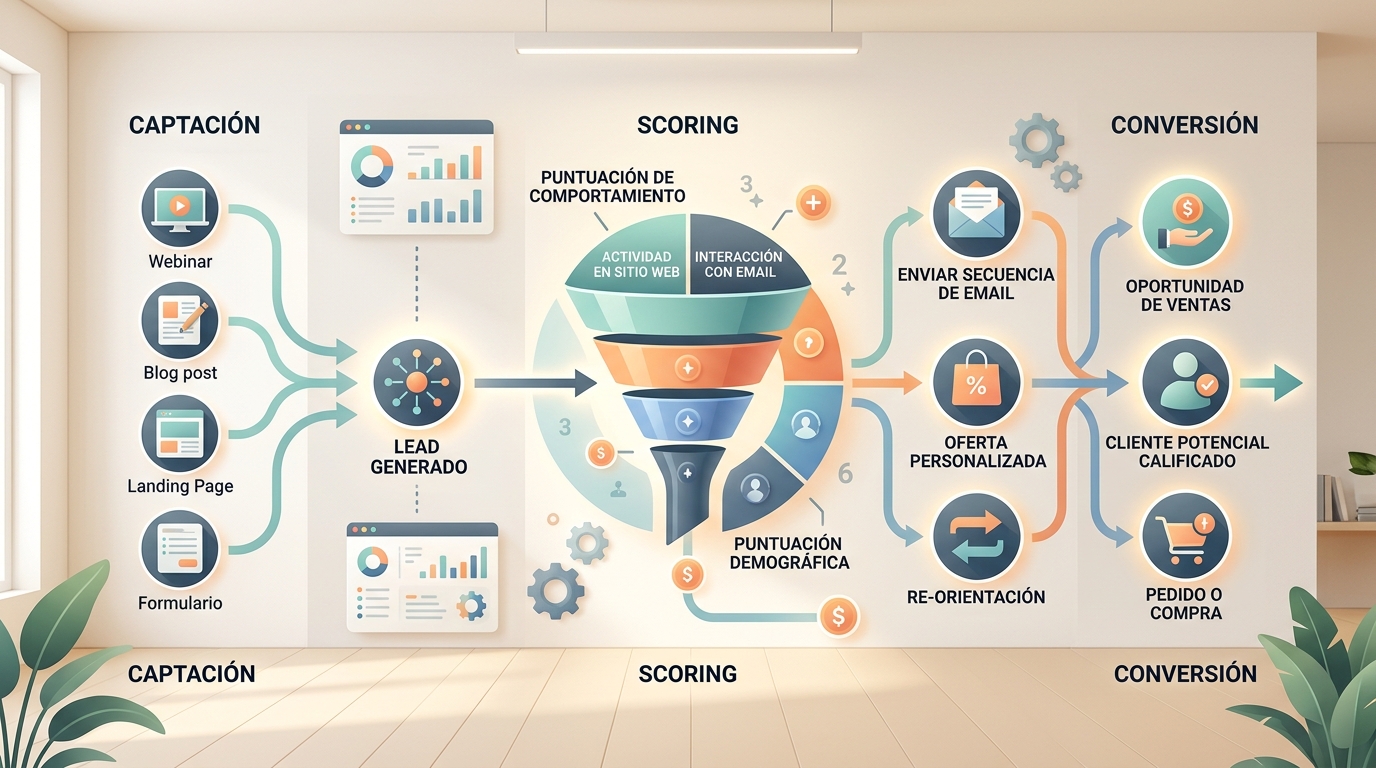
The first level of automation covers capture forms, landing pages, and the automatic assignment of tags or lists based on the lead's origin.
A visitor who downloads a specific resource can be automatically tagged with the resource's topic, the source channel, and the entry date. This data, collected without human intervention, allows for segmentation from the very first contact.
Current tools connect forms directly to the CRM and email platform, so the welcome sequence triggers automatically the moment the lead confirms their email. No one needs to press a button.
Nurturing and lead scoring
Automated lead nurturing involves sending relevant content based on the contact's behaviour: whether they open an email on a specific topic, visit a pricing page, or click a particular link. Each action adds or subtracts points in the lead scoringsystem, and when the contact reaches a defined threshold, they are automatically assigned to the sales team or a specific offer is activated.
This process can be configured without programming on most modern platforms. What it does require is upfront design time: deciding which behaviours indicate real interest and which are just noise.
Reactivation and retention
Reactivation workflows for inactive contacts and retention workflows for existing customers generate the quickest returns because they work with a base that already knows you.
A basic reactivation workflow can identify contacts with no activity in 90 days and send them a specific sequence before cleaning them from the list.
What are the key tools for automating without an agency?
Choosing the right tool is the most important decision when a business decides to manage its marketing automation internally. The wrong tool can create technical dependency equal to or greater than that generated by an agency. In 2026, the market offers three main categories: all-in-one platforms, specialised channel solutions, and orchestration platforms. For a business starting to internalise, the recommendation is to begin with an all-in-one platform and only add specialised tools when volume or complexity justifies it.
All-in-one platforms
, workflow automation, landing page builder, and basic reporting. The most used in the Spanish market in 2026 are HubSpot, ActiveCampaign, and Brevo. Each has a distinct positioning: email marketingHubSpot has the steepest learning curve but also the most comprehensive ecosystem. Its Starter plan is accessible for small businesses.
- ActiveCampaign excels in the depth of its automation rules and integration with external CRMs.
- Brevo (formerly Sendinblue) is the most economical option with sufficient functionalities for growing businesses.
- The choice depends on the volume of contacts, the monthly budget, and whether a consolidated CRM is already in place.
Integration tools
When the main platform doesn't natively connect with an existing system — an e-commerce, an ERP, a booking platform — integration tools like Zapier or Make (formerly Integromat) allow you to create code-free connections.
These platforms truly eliminate the need for a developer in most common use cases.
Analytics and attribution tools
Automation without visibility is blind. Google Analytics 4, combined with a well-structured UTM system, allows you to attribute conversions to each automated workflow. Without this step, it's impossible to know which automation generates real business and which merely creates noise in the database.
Setting up a marketing automation workflow from scratch, without an agency and without prior technical knowledge, is possible if you follow a logical sequence. The usual mistake is to start with the tool before the workflow logic is clear. The correct order is: define the objective, map the user journey, establish triggers, create the content, and configure the workflow on the platform. This process can be completed in a week for a basic workflow.
How to set up your first automated workflow step-by-step
Step 1: Define the workflow's objective
Each workflow must have a single, measurable objective. Not "improve customer relationships," but "convert the lead who downloads resource X into a sales meeting within 14 days".
A concrete objective determines the content of the emails, the sending frequency, and the success criteria.
Step 2: Map the journey and define the triggers
The trigger is the event that initiates the workflow: the download of a lead magnet, cart abandonment, or a visit to a pricing page. Each trigger must be linked to a clear signal of intent.
Workflows triggered by ambiguous events generate irrelevant messages and increase unsubscribe rates.
Step 3: Create the content before opening the platform
First, draft all the emails for the workflow in a simple text document. Define the subject line, body, and call to action for each. Only when the content is internally approved should you begin the technical configuration.
This order avoids iterating within the platform, which is slow and creates confusion.
Step 4: Configure, test, and launch
Once the workflow is set up, send test emails to internal accounts, verify that the triggers are working, and check that lead scoring is updating correctly.
Launching without testing is the source of 80% of automation incidents: emails sent twice, sequences that don't complete, or broken links.
Marketing professional reviewing metrics of an automated email workflow on a digital dashboard, full screen view, technical editorial style

Common mistakes when automating without an agency
Mistake 1: Automating before having clean data
A database with duplicates, invalid emails, or untagged contacts contaminates any workflow from the outset. Before activating any automation, it's essential to clean and segment the database. This step isn't glamorous, but it's what determines whether workflows succeed or fail.
Mistake 2: Creating overly complex workflows from the start
The temptation to replicate, from day one, the workflows of a company with years of data and dozens of segments leads to abandonment. 70% of complex workflows set up by inexperienced teams are never correctly configured.
The recommendation is to start with linear workflows of 3 to 5 steps, measure, optimise, and only add complexity once the basic workflow is functioning.
Mistake 3: Not defining exit conditions
A workflow without an exit condition is one that can send emails to contacts who have already purchased, unsubscribed, or are already in another workflow. Exit conditions — "if the contact buys, they exit the nurturing workflow" — are as important as entry conditions.
Mistake 4: Ignoring global contact frequency
When managing multiple workflows in parallel, a single contact can receive three or four emails in one day if a global frequency limit isn't set. Most platforms allow you to configure this limit at the account level.
Not activating it is one of the most common and most damaging mistakes for open rates.
What marketing automation tools can a business use without hiring an agency?
A business can manage its own automation with tools like Mailchimp, Brevo, or ActiveCampaign for emails, Hootsuite or Buffer for social media posts, and Zapier or Make for connecting applications without needing to code. The choice depends on the size of the business and the available budget. It's advisable to start with a single tool, master it well, and then expand. Many of these platforms offer free or low-cost plans that allow you to automate basic tasks from day one without relying on third parties.
How long does it take to see results with in-house marketing automation?
The first visible results usually appear between four and eight weeks after launching the initial automations. During this period, you can observe improvements in email open rates, greater consistency in customer communication, and savings in manual work hours. However, more solid results, such as increased sales or customer
customer loyalty , require three to six months of continuous adjustments. The key is to regularly review the data and correct what isn't working.What technical knowledge does the team need to automate marketing without external help?
No programming knowledge is needed. It's sufficient to know how to use spreadsheets, understand basic contact segmentation concepts, and have clarity on the company's communication objectives. Most current tools operate with visual drag-and-drop interfaces. It is important, however, for at least one team member to dedicate time to learning the chosen platform, preferably through the official tutorials and documentation offered by the providers themselves, which are usually free and available in Spanish.
What are the risks of automating marketing without the support of a specialised agency?
The main risk is incorrectly configuring automations and sending incorrect, repeated, or out-of-context messages to contacts, which can damage the company's image. Another common risk is failing to comply with data protection regulations, such as GDPR, when managing mailing lists without the proper permissions. There's also the risk of wasting time setting up tools that don't adapt to the business's actual needs. To mitigate these issues, it's advisable to start with simple processes, conduct tests before activating any automation, and regularly check that everything is working as expected.
What automation metrics should you monitor yourself?
Without an agency delivering reports, the control of automation metrics falls entirely to the internal team. This is an advantage, not a drawback: it means the team has direct access to the data without any editorial filter. The relevant metrics aren't the same for all workflows; they depend on the objective defined in Step 1. However, there's a set of baseline indicators that any marketing manager should review weekly.
Email metrics
Open Rate: indicates whether the subject line and sender generate interest. A rate below 20% in B2B lists is a red flag.
- Click-Through Rate (CTR): measures whether the email content generates action. It's the most direct indicator of relevance.
- Unsubscribe Rate: if it consistently exceeds 0.5% per send, it indicates a segmentation or frequency problem.
- Hard Bounce Rate: reflects the quality of the database. A high hard bounce rate harms the sender domain's reputation.
- Workflow and conversion metrics
Conversion Rate per Workflow: how many contacts entering the workflow complete the defined objective.
- Average Conversion Time: how many days it takes for a lead to convert from the moment they enter the workflow. This data allows you to adjust the sequence duration.
- Average Lead Scoring per Segment: if the scoring doesn't vary over time, the triggers aren't capturing real behaviour.
- Marketing automation metrics dashboard with open rate and conversion graphs, digital analytics monitor, business editorial style

Managing marketing automation without an agency doesn't mean rejecting all forms of external help. It means not delegating operational control. There are specific situations where hiring ad-hoc or specialised support offers a clear return and doesn't compromise the internal team's autonomy.
When it does make sense to hire external support
The first situation is the initial platform implementation.
Correctly configuring a CRM, establishing the property structure, defining the data model, and connecting external sources is a technical task that an internal team can do, but a specialist can complete in days rather than weeks.
Hiring that initial implementation as a closed project doesn't create dependency; on the contrary, it provides the team with a clean foundation from which to operate autonomously.
The second situation is when the volume or technical complexity exceeds the team's current capacity.
Integrations with legacy systems, custom API developments, or migrations between platforms are cases where the cost of learning it internally outweighs the cost of hiring external help on an ad-hoc basis.
The third situation is periodic auditing. Having an external eye review active workflows every six months — not to manage them, but to identify blind spots — is a practice many mature internal teams adopt. It's not dependency; it's operational hygiene.
The criterion for distinguishing healthy support from dependency is simple: after any external intervention, does the internal team understand what has been done and can they maintain it themselves? If the answer is yes, the support was healthy.
If the answer is no, a new layer of dependency has been created that will need to be broken later.
If the answer is no, a new layer of dependency has been created that will need to be broken later.

Ultimately, marketing automation without an agency isn't a declaration of war on external providers. It's an operational architecture decision that places control, data, and responsiveness where they're most needed: within the team that lives and breathes the business every single day.
